How to make Android CheckBox and RadioButton custom style
Hi,
Anybody know that real cool Android application must have not only excelent business logic. The one of the most important things what application must have is a nice UI.
If you want to create realy interesting application you need to create good UI. And …. hire a designer 🙂
Below i want to tell you how to create your own CheckBoxes and RadioButtons for your Android Applications. Sorry for this sample UI design. I didn’t hire a designer :).
First look at screenshot:
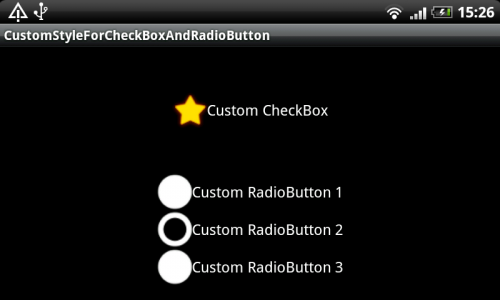
Here you can see simple app with only one activity. Also below you can download the source code of Android project.
To make your own style for CheckBox or RadioButton you need to do next:
- Create Image Drawables for their two stater (checked/unchecked)
- Create selector for this two drawables. The sample content must be seem like this:
<?xml version="1.0" encoding="utf-8">
<selector xmlns:android="http://schemas.android.com/apk/res/android">
    <item android:state_checked="true" android:drawable="@drawable/star_down"></item>
    <item android:state_checked="false" android:drawable="@drawable/star"></item>
</selector>- Add this selector as android:button attribute for CheckBox or RadioButton
<CheckBox android:text="Custom CheckBox"
    android:button="@drawable/checkbox_selector"
    android:layout_width="wrap_content"
    android:layout_height="wrap_content">
That’s all. To make custom style for CheckBox and RadioButton you must do same steps.
Here you can download the Android project with the sample.


23 Comments
fergonrom · 6 October, 2011 at 00:28
Good job. It have been util for me but I’ve got a problem and I can’t donwload the project because the link is wrong.
I’d appreciate your solutions as.
Thanks!
Igor · 6 October, 2011 at 08:39
Hi, fergonrom
Please, check the link. I just made some changes.
You are welcome!
MIke · 18 October, 2011 at 04:29
Hi , thanks for this!. How can I do this dynamically through code?
-Mike
Igor · 21 October, 2011 at 14:21
Hi, Mike
You can do it through code. Just do next:
checkBox.setButtonDrawable(R.drawable.checkbox_selector);
That’s all.
Mia Wallace · 12 November, 2011 at 22:13
Thank you so much.
I´ve been very useful for my first android application.
Abhishek · 16 January, 2012 at 08:25
Hi Igor Khrupin
Thanks for explaining the custom concept of checkbox : )))))
Larry · 4 March, 2012 at 19:15
Thank you very much for the easy to follow example.
eCorke · 5 March, 2012 at 02:48
yeah, thanks man, simple, clear solution.. thanks again 🙂
Tony · 1 April, 2012 at 21:43
Very nice, I was trying to solve this. Worked the first time.
Thanks!
sham · 5 April, 2012 at 11:28
Error generating final archive: Failed to seal APK
I found this error while executing the above code.. im new to android, can u plz help me out
Igor · 5 April, 2012 at 11:54
Hi, sham
Could you please give me Logcat output for this error
JGR · 12 April, 2012 at 04:40
hi! in the checkbox, how can I change the size of the image dinamically.. like in a imageview–> android:scaleType=”centerCrop”?.. lets take your star example. if I have a bigger size star.png the checkbox would wrap_content this. How can I crop it?
marco · 7 May, 2012 at 16:46
Fantastic Tutorial, thanks.
Ankur Paliwal · 31 May, 2012 at 07:57
fantastic
Excellent!!! · 2 June, 2012 at 16:54
Excelent tutorial, thanks a lot mat!
mobile application development · 5 June, 2012 at 08:11
I am sure that what you have said will definitely pierce the ears of your readers and make them think more deeply about it
Craig · 9 June, 2012 at 22:26
How do you resize the checkbox, though? I’m trying to do it in the XML and just cannot figure it out. There are no “scale type” or “adjust view bounds” properties for checkboxes, and things like “max height” seem to have no effect.
Chirag · 25 June, 2012 at 11:03
Hi,
I think this was a good example and explains a lot about check boxes and radio buttons.
But I am having a tough time displaying an image as the content of the radiobutton. This next line will make it clear:
(0) Image1
(0) Image2
Is it possible to add image in such a manner to a radiobutton? If Yes, how? I have to do the same to checkbox also. Is it possible for checkbox? If yes how?
Joonasj · 2 July, 2012 at 10:08
Hi!
Is it also possible to change the pressed stage by this method?
mzennis · 9 June, 2014 at 04:37
its all i need, tq so much ^^
satish · 17 June, 2014 at 08:06
IOS and Android
kevin kuan · 11 March, 2020 at 19:27
2020 Thanks you!!
Husniddin · 8 July, 2021 at 10:32
I use the same way, the preview in my android studio shows as I want, but when I run the app, the CheckBox’s style doesn’t change. Why?