UPDATE: Now this is not working. Google API changed. Recently a have some task in my Android project.
I needed to show route (directions) between two points (geopoins)on google maps in Android.
I thought it can be simple task. But It was a lot of interesting things :).
I’ve discovered a lot of topics of this problem.
I find one usefull. This is IT
But, it didn’t works for me.
Here I want to show my changes of this project.
Below you can download source code of sample Android project.
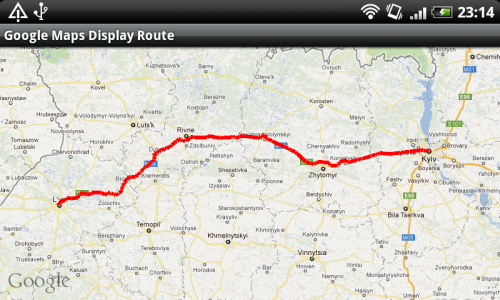
Here is screenshot:
The major changes is in KML parser. Here is this class:
package com.hrupin.maproute.route;
import java.io.InputStream;
import javax.xml.parsers.DocumentBuilderFactory;
import javax.xml.xpath.XPath;
import javax.xml.xpath.XPathExpression;
import javax.xml.xpath.XPathFactory;
import org.w3c.dom.Document;
public class RoadProvider {
private static Document xmlDocument;
public static Road getRoute(InputStream is) {
Road mRoad = new Road();
String expression = "string(//Placemark/GeometryCollection/LineString/coordinates)";
String expression2 = "string(//Placemark[contains(name, 'Route')]/description)";
try {
xmlDocument = DocumentBuilderFactory.newInstance().newDocumentBuilder().parse(is);
XPathFactory xPathFactory = XPathFactory.newInstance();
XPath xPath = xPathFactory.newXPath();
XPathExpression xPathExpression = xPath.compile(expression);
String result = xPathExpression.evaluate(xmlDocument);
String[] arr1 = result.split(" ");
for (String str : arr1) {
String[] coords = str.split(",");
if (coords.length == 3) {
double[] xy = new double[] {};
double x = Double.parseDouble(coords[0]);
double y = Double.parseDouble(coords[1]);
xy = addDouble(xy, x);
xy = addDouble(xy, y);
mRoad.mRoute = addDouble(mRoad.mRoute, xy);
System.out.println("PARSING ..... ");
}
}
xPathExpression = xPath.compile(expression2);
String description = xPathExpression.evaluate(xmlDocument);
mRoad.mDescription = cleanup(description);
System.out.println("DESCRIPTION = " + mRoad.mDescription);
} catch (Exception ex) {
ex.printStackTrace();
}
return mRoad;
}
static double[][] addDouble(double[][] array, double[] element) {
int arrayLength = array.length;
double[][] result = new double[arrayLength + 1][];
for (int i = 0; i < arrayLength; i++) {
int elementLength = array[i].length;
result[i] = new double[elementLength];
for (int j = 0; j < elementLength; j++)
result[i][j] = array[i][j];
}
int newElementLength = element.length;
result[arrayLength] = new double[newElementLength];
for (int j = 0; j < newElementLength; j++)
result[arrayLength][j] = element[j];
return result;
}
static double[] addDouble(double[] array, double element) {
int arrayLength = array.length;
double[] result = new double[arrayLength + 1];
for (int i = 0; i < arrayLength; i++)
result[i] = array[i];
result[arrayLength] = element;
return result;
}
public static String getUrl(double fromLat, double fromLon, double toLat, double toLon) {
StringBuffer urlString = new StringBuffer();
urlString.append("http://maps.google.com/maps?f=d&hl=en");
urlString.append("&saddr=");
urlString.append(Double.toString(fromLat));
urlString.append(",");
urlString.append(Double.toString(fromLon));
urlString.append("&daddr=");
urlString.append(Double.toString(toLat));
urlString.append(",");
urlString.append(Double.toString(toLon));
urlString.append("&ie=UTF8&0&om=0&output=kml");
return urlString.toString();
}
private static String cleanup(String value) {
String remove = "<br/>";
int index = value.indexOf(remove);
if (index != -1)
value = value.substring(0, index);
remove = " ";
index = value.indexOf(remove);
int len = remove.length();
while (index != -1) {
value = value.substring(0, index).concat(value.substring(index + len, value.length()));
index = value.indexOf(remove);
}
return value;
}
}Enjoy! 🙂
Here you can download the source code of this Android Project.