Month: March 2017

  • Example usage of GeofencingApi in Android

    Example usage of GeofencingApi in Android

    GeofencingApi is great feature for making notifications when user enter to specific place on map and also exit from specific place.

    I’ve updated official GeofencingApi tutorial to make it more visual.

    Here application which able register geofence just after map click. Use it for register your place and test how it works. This app have nice overlays which show whole geofence area (Red circle).

    Here is YouTube with app in action

    And link to github

    Download it from github
  • How to keep background activities in Xiaomi Redmi Note 3 with MIUI 8.1.3.0

    How to keep background activities in Xiaomi Redmi Note 3 with MIUI 8.1.3.0

    If you see this post then you probably have problem with running Android Service or other background activity in Xiaomi Redmi Note 3 phone.

    MIUI ROM usually kill background activity after 5-10 minutes user inactivity.

    So, how to make applications with location based or other services works with MIUI.

    For now I’ve got solution which can be done by end user.

    1. End user should go to Settings –> Battery & performance –> Manage apps battery usage –> Choose apps.
    2. Click on application.
    3. Choose “No restriction”
    4. And if your application work with background location the also choose “Allow” for BACKGROUND LOCATION.

    Below short video with these steps

  • How to Dynamically or Programmatically Add Menu Items for an Android Activity

    How to Dynamically or Programmatically Add Menu Items for an Android Activity

    2017-03-04-17-25-56

    Sometimes you don’t need huge menu. And int is’t super important create XML file for it.

    You can just create your menu from code. It is very simple.

    You need override `

    public boolean onPrepareOptionsMenu(Menu menu)

    ` method. Let’s see the example below:

    @Override
    public boolean onPrepareOptionsMenu(Menu menu) {
        menu.clear();
        menu.add(0, MENU_EDIT, Menu.NONE, getString(R.string.menu_action_edit)).setIcon(R.drawable.ic_action_edit).setShowAsAction(MenuItem.SHOW_AS_ACTION_ALWAYS);
        menu.add(0, MENU_DELETE, Menu.NONE, getString(R.string.menu_action_delete)).setIcon(R.drawable.ic_action_delete).setShowAsAction(MenuItem.SHOW_AS_ACTION_ALWAYS);
        return super.onPrepareOptionsMenu(menu);
    }

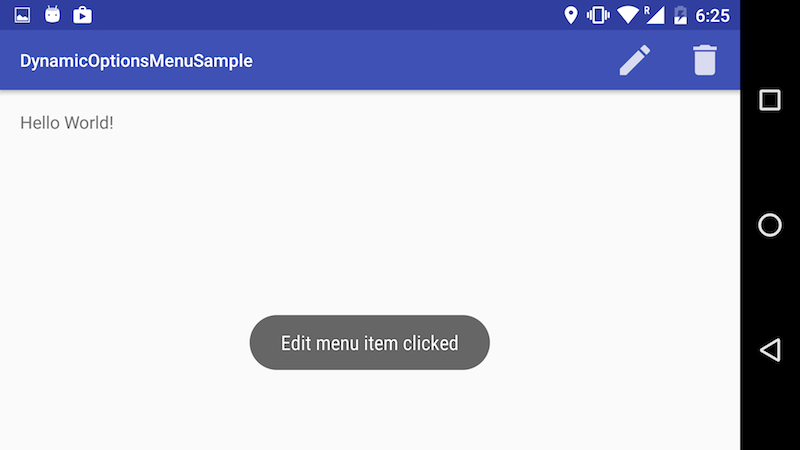
    Here is you have created two menu items “Edit” and “Delete”. This menu items has showAsAction `

    MenuItem.SHOW_AS_ACTION_ALWAYS

    `. You can change it for your requirements. Also you can group menu items. For example my menu items in group with id = 0.

    Also you can handle menu click actions. It is pretty same to XML menus. Let’s see:

    @Override
    public boolean onOptionsItemSelected(MenuItem item) {
        switch (item.getItemId()) {
            case MENU_EDIT:
                Toast.makeText(this, "Edit menu item clicked", Toast.LENGTH_SHORT).show();
                break;
            case MENU_DELETE:
                Toast.makeText(this, "Delete menu item clicked", Toast.LENGTH_SHORT).show();
                break;
        }
        return false;
    }

    As you can see it is very simple. You don’t need addition files in your project for just two menus. Use this approach.

    Hope it help you.

    Also here is link to github project.

    Download it from github