Month: April 2017

  • Android & Continuous Integration & HockeyApp

    Android & Continuous Integration & HockeyApp

    Hey!

    Here is the case. We need build Android application, test it using Continuous Integration. After that we need upload APK to HockeyApp.

    The first part is well known.

    So, how to upload APK to HockeyApp using command line?

    I’ll refer you to HockeyApp API.

    To make any interaction with HockeyApp we should have Token.

    Here is link for obtaining HockeyApp token: https://rink.hockeyapp.net/manage/auth_tokens
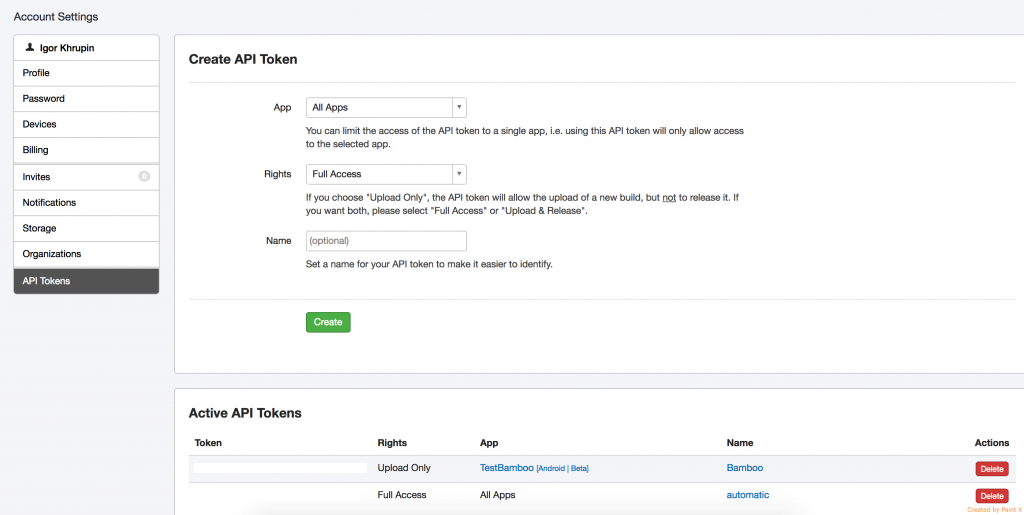
    After that we able create script for sending APK like this:

    curl \
    -F "status=2" \
    -F "notify=1" \
    -F "notes=NOTES HERE" \
    -F "notes_type=0" \
    -F "ipa=@build.apk" \
    -H "X-HockeyAppToken:TOKEN_HERE" \
    https://rink.hockeyapp.net/api/2/apps/upload
     

  • Calendar DayView for Android

    Calendar DayView for Android

    I had to create logic which should arrange events properly on DayView timeline.
    I’ve researched many solutions in the internet and here is solution which can be easy implemented in Android.
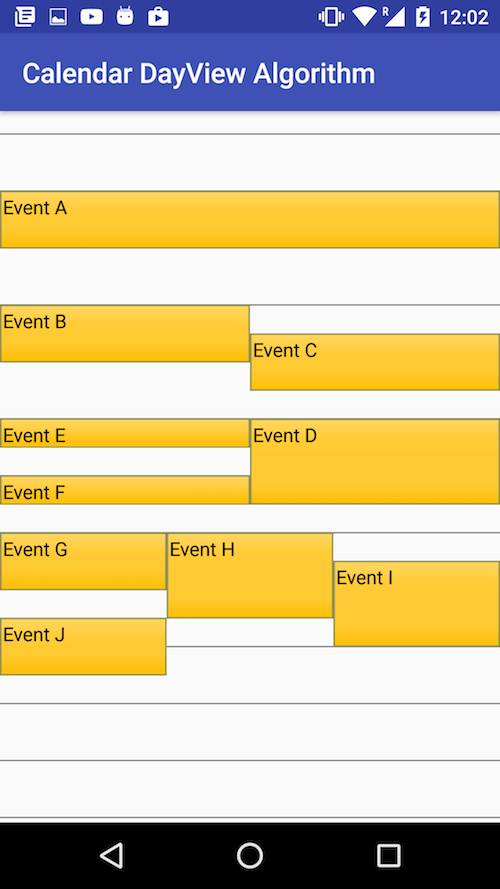
    I’ve implemented this task visually like Google Calendar. Like this.

    Please have a look my solution.

    To draw the DayView we need do the next steps:

    1. Sort events by start time and end time.
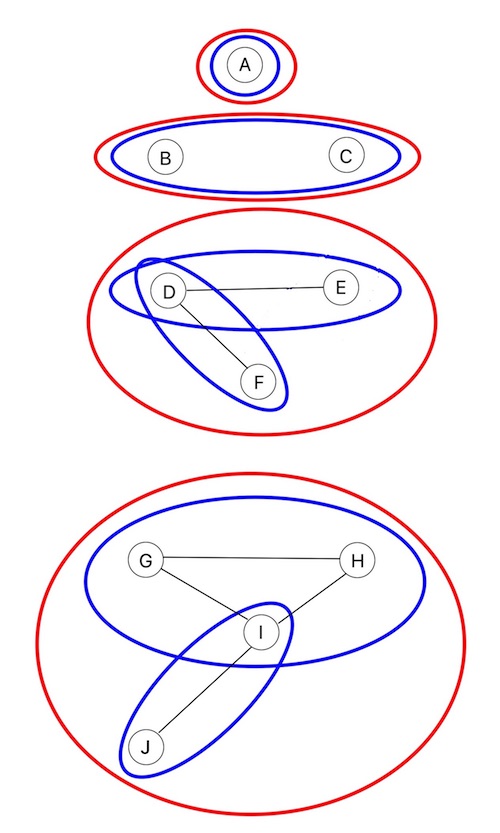
    2. Find events which have shared time. Even that just 1 minute. This group of events called Clique.
    3. Find cliques which have shared events. This group of cliques called Clusters.

    Cliques and clusters you can see in the attached image.

    Cliques – blue ovals, Clusters – red ovals.

    After that we can start draw the clusters.

    1. Y coordinate for event calculated from start and end event time.
    2. X coordinate for event calculated based on event width and position in cluster.
    3. WIDTH for event = SCREEN_WIDTH / MAX_CLIQUE_SIZE_IN_CLUSTER.

    Example:
    Cluster contains 5 events arranged by start and end time.
    Max clique size = 3;
    Event Width = screen_width / 3;

    Event1:
    X = 0 * width = 0;

    Event2:
    X = 1 * width;

    Event1:
    X = 2 * width;

    Event1:
    X = 0 * width = 0;

    Event1:
    X = 1 * width;

    That’s all.

    The source code on github.

    Please let me know what you think about this solution in comments

    Download it from github