Let me tell you how i installed Canon Pixma IP3600 printer driver in Ubuntu 10.04 Lucid Lynx and made it works.
Yesterday, i needed to install driver for my IJ printer. I tried to found it in Ubuntu software center, but it was unsuccess.
Next i downloaded the driver from official web site: Debian Linux Printer Driver .In this .tar archive i was found three files:
- cnijfilter-common_3.00-1_i386.deb – common .deb file. Needs to … i think … to all Canon printers.
- cnijfilter-ip3600series_3.00-1_i386.deb – driver for printer with PPD file.
- cnijfilter-common-3.00-1.tar.gz – source
I tried to install this .deb packages, but it was unsuccess. I’ve got an error depended with libcupsys2 library (in new release this library replaced by libcups2). I changed library libcupsys2 to libcups2 in packages then rebuild it and install in my OS (Ubuntu 10.04) succesful. I show you how i did this.
- Download the archive with packages from oficial website: Debian Linux Printer Driver
- Untar this archive.
- Open terminal and execute next command according by your .deb packages dir location:
dpkg-deb -x cnijfilter-common_3.00-1_i386.deb common
dpkg-deb --control cnijfilter-common_3.00-1_i386.deb
- You will got two dirs (common, DEBIAN). Open DEBIAN/control file and replace libcupsys2 by libcups2. After changes save it.
- Move whole DEBIAN dir in to common dir
- Next you need to create .deb package from common dir:
dpkg -b common new_cnijfilter-common_3.00-1_i386.deb
- Now you can install this package with no problem.
- Do same operations (steps 3-7) with other .deb file (cnijfilter-ip3600series_3.00-1_i386.deb)
After installation the system tells you that printer is ready to print. But if you start print job you have got some issue:
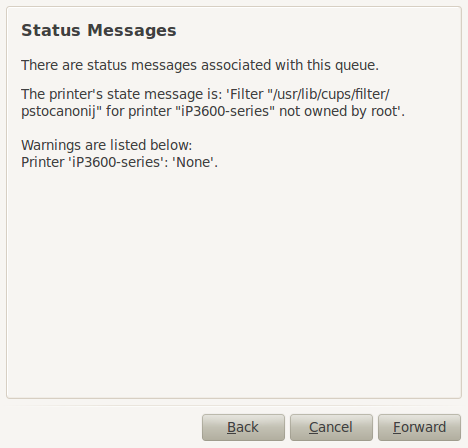
igor@igor-laptop:/usr/lib/cups/filter$ ls -l
-rwxr-xr-x 1 igor igor  21044 2008-11-05 08:06 pstocanonij
To fix this you must change /usr/lib/cups/filter/pstocanonij file owner to root.
sudo chown root:root /usr/lib/cups/filter/pstocanonijThats all. Enjoy printing with Canon Pixma IP3600 printer on Ubuntu.
To make this operation simple for me i write some bash script: ip3600.sh .Below you can download archive with this script. Just untar this archive to work with it.
tar xvf ip3600.sh.tar.gzAnd run this script with sudo. Example of usage:
ip3600_debian_printer – dir which contains cnijfilter-common_3.00-1_i386.deb ,cnijfilter-ip3600series_3.00-1_i386.deb, cnijfilter-common-3.00-1.tar.gz files
sudo ./ip3600.sh ~/Temp/ip3600_debian_printer/For more information look in ip3600.sh file. I not guarantee that this script (ip3600.sh) will works in your system.
I hope it will useful for you.