How to use hexadecimal colours in iOS
I have develop the iOS application which based on design with hexadecimal colours (“#fff”, “#ff0000”, “#88ff0000”).
To use the same in the iOS I’ve created special method witch can help me with it.
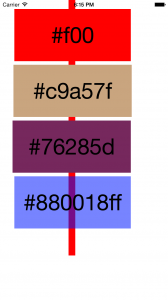
iOS Simulator Screenshot
Below you can see snippet of m-file.
+ (UIColor *) colorFromHexString:(NSString *)hexString {
    NSString *cleanString = [hexString stringByReplacingOccurrencesOfString:@"#" withString:@""];
    if([cleanString length] == 3) {
        NSString *red = [cleanString substringWithRange:NSMakeRange(0, 1)];
        NSString *green = [cleanString substringWithRange:NSMakeRange(1, 1)];
        NSString *blue = [cleanString substringWithRange:NSMakeRange(2, 1)];
        cleanString = [NSString stringWithFormat:@"ff%1$@%1$@%2$@%2$@%3$@%3$@", red, green, blue];
    }else if([cleanString length] == 6) {
        cleanString = [@"ff" stringByAppendingString:cleanString];
    }else{
        //do nothing
    }

    NSLog(@"%@", cleanString);

    unsigned int rgba;
    [[NSScanner scannerWithString:cleanString] scanHexInt:&rgba];

    CGFloat alpha = ((rgba & 0xFF000000) >> 24) / 255.0f;
    CGFloat red = ((rgba & 0x00FF0000) >> 16) / 255.0f;
    CGFloat green = ((rgba & 0x0000FF00) >> 8) / 255.0f;
    CGFloat blue = (rgba & 0x000000FF) / 255.0f;

    return [UIColor colorWithRed:red green:green blue:blue alpha:alpha];
}

0 Comments