How to make custom indeterminate ProgressBar in Android or how to change ProgressBar style or color
Hi,
Here i want to show you how easily make your own Android ProgressBar style or how to change ProgressBar color.
It is very easy! Also below you can download source code of Android project.
Below you can see the screenShot with ProgressBar
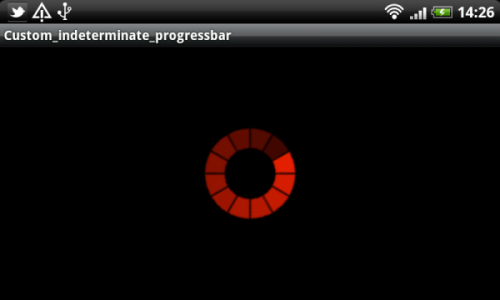
To do this you need:
- Create the image for this ProgressBar in any graphical editor.
- Create animation drawable with content:
<?xml version="1.0" encoding="utf-8"?>
<animated-rotate
    xmlns:android="http://schemas.android.com/apk/res/android"
    android:drawable="@drawable/image_for_rotation"
    android:pivotX="50%"
	android:pivotY="50%" />
Where @drawable/image_for_rotation is the resource of your progressBar image.
Select android:indeterminateDrawable for ProgressBar witget.
<?xml version="1.0" encoding="utf-8"?>
<LinearLayout xmlns:android="http://schemas.android.com/apk/res/android"
    android:orientation="vertical"
    android:layout_width="fill_parent"
    android:layout_height="fill_parent"
    android:gravity="center">
    <ProgressBar android:indeterminateDrawable="@drawable/my_progress_indeterminate" android:layout_height="100dp" android:layout_width="100dp"></ProgressBar>
</LinearLayout>
Enjoy! 🙂
Here you can download Sample project with custom Android ProgressBar.


19 Comments
Anees · 23 September, 2011 at 06:46
Good one !!!! Helped to create a smooth custom progress bar.
bos · 10 October, 2011 at 08:32
brilliant! thanx
Igor · 10 October, 2011 at 08:38
You’re welcome, guys
Jesse · 10 January, 2012 at 01:11
Great!
Atul bhardwaj · 13 January, 2012 at 13:17
Great code
Deepthi G · 27 February, 2012 at 13:42
Great post!! 🙂 Keep up the great work!! May be you can visit my humble blog too..
Regards
Deepthi G
Ramesh · 16 April, 2012 at 12:54
Nice! Its really superb trick!
Greg · 18 April, 2012 at 11:10
great help for me. Thanks a lot!!
Vish · 18 May, 2012 at 16:45
Thanks a lot. You saved my time & it worked nicely.
raheel · 12 July, 2012 at 08:25
hi , gr8 tutorial,
i have a question, how can i increase the speed of the rotation
Rafsan · 27 July, 2012 at 21:46
How can i stop this progressBer. Is there any process to set the duration?
Igor · 28 July, 2012 at 11:44
Hello, Rafsan
The intermediate progress bar cannot be stopped. You can make it invisible. I’ll doing this task in this way.
manel · 2 August, 2012 at 20:03
help me please for develpped android
Dude · 7 August, 2012 at 03:46
nice bro
prasad · 8 August, 2012 at 17:47
how to make a transparent webview behind a gridview.
Igor · 9 August, 2012 at 00:23
Hello prasad,
I’ve posted info special for you 🙂
Hope, It help you http://www.hrupin.com/2012/08/how-to-make-a-transparent-webview-in-android
Igor · 9 August, 2012 at 00:24
Hello manel,
What help do you need?
prasad · 9 August, 2012 at 11:43
thanks bro for ur reply…..i will tell were iam stuck..i have a home page with two buttons and and weview showing google.com..when i click on one button one gridview should come…the grid view should be above the webview we should see both the web view and gridview …and if i click the same button gridview should go and webview should be seen how this transparency can be achieved plz help..iam stuck here
prasad · 9 August, 2012 at 12:15
bro can this progress bar be used while switching between webpages in application in same layout………..