How to Clear User Data in your Android Application programmatically

How to clear user data of your application programmatically? Here I share with you my solution how to do this.
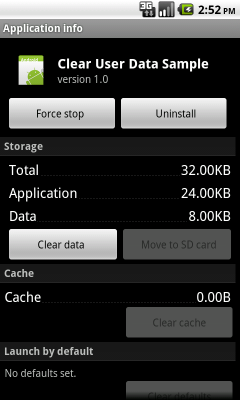
You also can clear your user data by clicking “Clear Data” button in Settings–>Applications–>Manage Aplications–> YOUR APPLICATION

To do it programmatically you need to remove user data from application dir.

Below you can download source code of sample Android project.

Pay attention in MyApplication class:

package com.hrupin.cleaner;

import java.io.File;

import android.app.Application;
import android.util.Log;

public class MyApplication extends Application {
	private static MyApplication instance;

	@Override
	public void onCreate() {
		super.onCreate();
		instance = this;
	}
	
	public static MyApplication getInstance(){
		return instance;
	}
	
	public void clearApplicationData() {
		File cache = getCacheDir();
		File appDir = new File(cache.getParent());
		if(appDir.exists()){
			String[] children = appDir.list();
			for(String s : children){
				if(!s.equals("lib")){
					deleteDir(new File(appDir, s));
					Log.i("TAG", "File /data/data/APP_PACKAGE/" + s +" DELETED");
				}
			}
		}
	}
	
	public static boolean deleteDir(File dir) {
	    if (dir != null && dir.isDirectory()) {
	        String[] children = dir.list();
	        for (int i = 0; i < children.length; i++) {
	            boolean success = deleteDir(new File(dir, children[i]));
	            if (!success) {
	                return false;
	            }
	        }
	    }

	    return dir.delete();
	}
}

Download it from github

Comments

28 responses to “How to Clear User Data in your Android Application programmatically”

  1. Mark waugh Avatar
    Mark waugh

    Thanks for this informative post. I’m using Android and using “Clear Data” to clear user data. But programmatically option is new to me and I’ll try it on. 🙂

  2. Remote Data Centre Avatar
    Remote Data Centre

    Oh this is sweet i know how to program a little bit. and this information will come in handy in the future.

  3. Damin martin Avatar
    Damin martin

    Cool buddy!! I’m following exactly same way you describe to clear my Android user data. It’s really good and thanks for informative info.

  4. Gagan Singh Avatar
    Gagan Singh

    I Was used this code in my personal code but data is not cleared properly some data is not cleared when i checked in settings->application->manage application->app_name.
    Every time near about 4 kb data is remaining ,idon’t know why?
    please help……………….

  5. Igor Avatar

    Hi, Gagan Singh
    Are your application store all data in /data/data/ dir?

    I think it may happens if some of your app data stores in SD card.

  6. zeus Avatar
    zeus

    Thanks , I’ve been looking for this exactly .

    It comes very useful when performing clean-ups on Android JUnit Test.

    Thanks again 😀

  7. Hoffi Avatar
    Hoffi

    Hi Igor,

    thank you for this very informative post. I was searching for a way to clear the app data programmatically and you give me the solution 😉

  8. Jorge Pizarro Avatar
    Jorge Pizarro

    is there a way to clear the data programatically, but leave out shared preferences untouched? thanks in advance

  9. sreelal Avatar
    sreelal

    Hi,

    is there any way to clear other applications app data or uninstall app silently ….i dont want clear my current app data ,need to clear other app data…

    1. Igor Khrupin Avatar

      Hi sreelal,
      I think this is impossible to make clear data or remove other application without special permissions.
      I know about some special relations between application which signed with same certificate.

  10. antony Avatar
    antony

    very nice forum
    thanks.

  11. chillsakoon Avatar
    chillsakoon

    Dear is there need any special permission in manifist file? for clear data, cache

  12. Aleration Avatar
    Aleration

    Very Good! I need this source… Thank you very very much!

  13. Thit Oo Avatar
    Thit Oo

    it was many useful for me .
    Thank a lot

  14. Gonzalo Avatar
    Gonzalo

    What should you put in the asterisks? (**********)

    1. Igor Khrupin Avatar

      Nothing. I’ve updated post for better understanding

      1. Gonzalo Avatar
        Gonzalo

        Yes!. thank you very much

  15. Peter Avatar
    Peter

    Thank you so much for this nice post. A question: Why must the class extend Application? An Explanation would be great!

    1. Igor Khrupin Avatar

      Peter,
      We need do it to use this class as Application class in the manifest. Please read docs from here: http://developer.android.com/reference/android/app/Application.html

  16. harman Avatar
    harman

    how can we clear cache in api 23

  17. mona Avatar
    mona

    Hi khrupin, your article is great that helps me 🙂 .
    How to know the size of the app data before i clear them programatically?

    1. Igor Khrupin Avatar

      Hi Mona, Please have a look my post about directory size:
      https://github.com/ihrupin/samples/tree/master/android/ApplicationCacheDirSize
      Happy coding 🙂

  18. drapoel Avatar
    drapoel

    Thanks for the article
    But is there a way to Clear all Data in all applications and not in one application
    and thank you

    1. Igor Khrupin Avatar

      Hi drapoel,
      There is no way for clear data in all applications.
      Because of security reason.
      But it can be possible if your device is rooted.

    2. Igor Khrupin Avatar

      Hi drapoel,
      There is no way for clear data in all applications.
      It is security reason.
      But it can be possible if your device is rooted.

      1. jefferson Avatar
        jefferson

        assuming it is rooted. what would be the code to delete other application data? thanks.

      2. jefferson Avatar
        jefferson

        if it is rooted what would be the exact code?

        1. Igor Khrupin Avatar

          I don’t have exact code, but idea the same you should go to `/data/data/` folder and clear the data.
          I’ve never done it before. Let me know how it works on your side.
          Thanks

Leave a Reply

Your email address will not be published. Required fields are marked *

This site uses Akismet to reduce spam. Learn how your comment data is processed.