How to create custom groupIndicator for ExpandableListView group
Here is tutorial How to create custon groupIndicator for ExpandableListView in Andriod.
Here is screenshot:
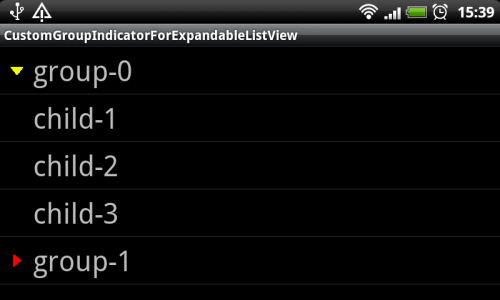
To do it you need:
1. Create 9-patch images for normal and expanded state
2. Create selector with this 9-patch images
<selector xmlns:android="http://schemas.android.com/apk/res/android">
    <item android:state_expanded="true" android:drawable="@drawable/group_indicator_expanded" />
    <item android:drawable="@drawable/group_indicator" />
</selector>
3. Set this selector as groupIndicator for ExpandableListView
<?xml version="1.0" encoding="utf-8"?>
<LinearLayout xmlns:android="http://schemas.android.com/apk/res/android"
    android:layout_width="fill_parent"
    android:layout_height="fill_parent"
    android:orientation="vertical" >
    <ExpandableListView
        android:id="@+id/expandableListView1"
        android:layout_width="match_parent"
        android:layout_height="match_parent"
        android:groupIndicator="@drawable/group_indicator_selector" >
    </ExpandableListView>
</LinearLayout>
That’s all.
Here you can download the source code of sample Android project


1 Comment
blackhat unlimited proxies · 22 August, 2012 at 14:03
Helpful information. Lucky me I discovered your web site accidentally, and I am surprised why this accident did not came about earlier! I bookmarked it.